

Download
Argus is a native desktop app that lives in your menu bar on macOS or your system tray on Windows. It keeps your local session data current and opens Argus in your browser, with no separate setup.
Not ready to install? Try the live demo, a read-only copy of Argus filled with sample data.
Install on macOS
- Open the downloaded
.dmg. - Drag Argus into your Applications folder.
- Eject the disk image, then launch Argus from Applications (or Spotlight).
Once it's running, look for the Argus icon in your menu bar. Open it to see your usage.
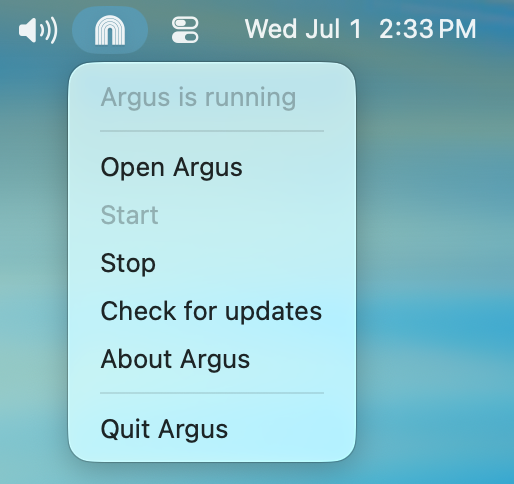
If macOS blocks the app on first launch
If you see a warning that the app can't be opened, right-click (or Control-click) Argus in Applications and choose Open, then confirm. You only need to do this once. Alternatively, open System Settings → Privacy & Security and click Open Anyway.
Install on Windows
- Run the downloaded installer. Its name ends in
x64-setup.exefor Windows x64 orarm64-setup.exefor Windows ARM. It sets Argus up for your user account, so no administrator sign-off is needed. - When it finishes, Argus starts and its icon appears in your system tray, in the bottom-right corner of your screen (it may be tucked behind the
^arrow). Open it to see your usage.
The Windows download button checks your browser's reported architecture and selects the matching installer when it can. If your browser doesn't report an architecture, it opens the latest release with links for choosing x64 or ARM64.
If Windows warns about the installer
If Microsoft Defender SmartScreen shows "Windows protected your PC", click More info, then Run anyway. A fresh release can trigger this until Windows has seen enough downloads to trust it.
Argus starts when you sign in
After the first launch, Argus starts on its own whenever you sign in to your computer, so your data stays current even after a restart. Turn that off under Startup in Settings if you'd rather launch it yourself.
Updating
Argus checks for new versions and updates itself in the background, so you stay on the latest release without re-downloading. You can always grab the most recent build from this page or from the GitHub releases.
Prefer the command line?
You don't need the app to use Argus. If you'd rather run it directly, the command-line tool works through npx (Node.js 20.17 or newer):
npx @agentdeploymentco/argus serve --openSee Quick Start for what Argus shows you.