

Tasks
A task is one thing you set out to do in a session, like researching an account, drafting a post or cleaning up a spreadsheet. Argus reads each session with a model, groups its back-and-forth into the tasks you worked on and judges how each one went.
This is the one place Argus uses a model to interpret your sessions. It's what lets you see not just how many tokens and how much cost a session used, but which of your goals succeeded and what each one took.
Task details
For each task it finds, Argus records:
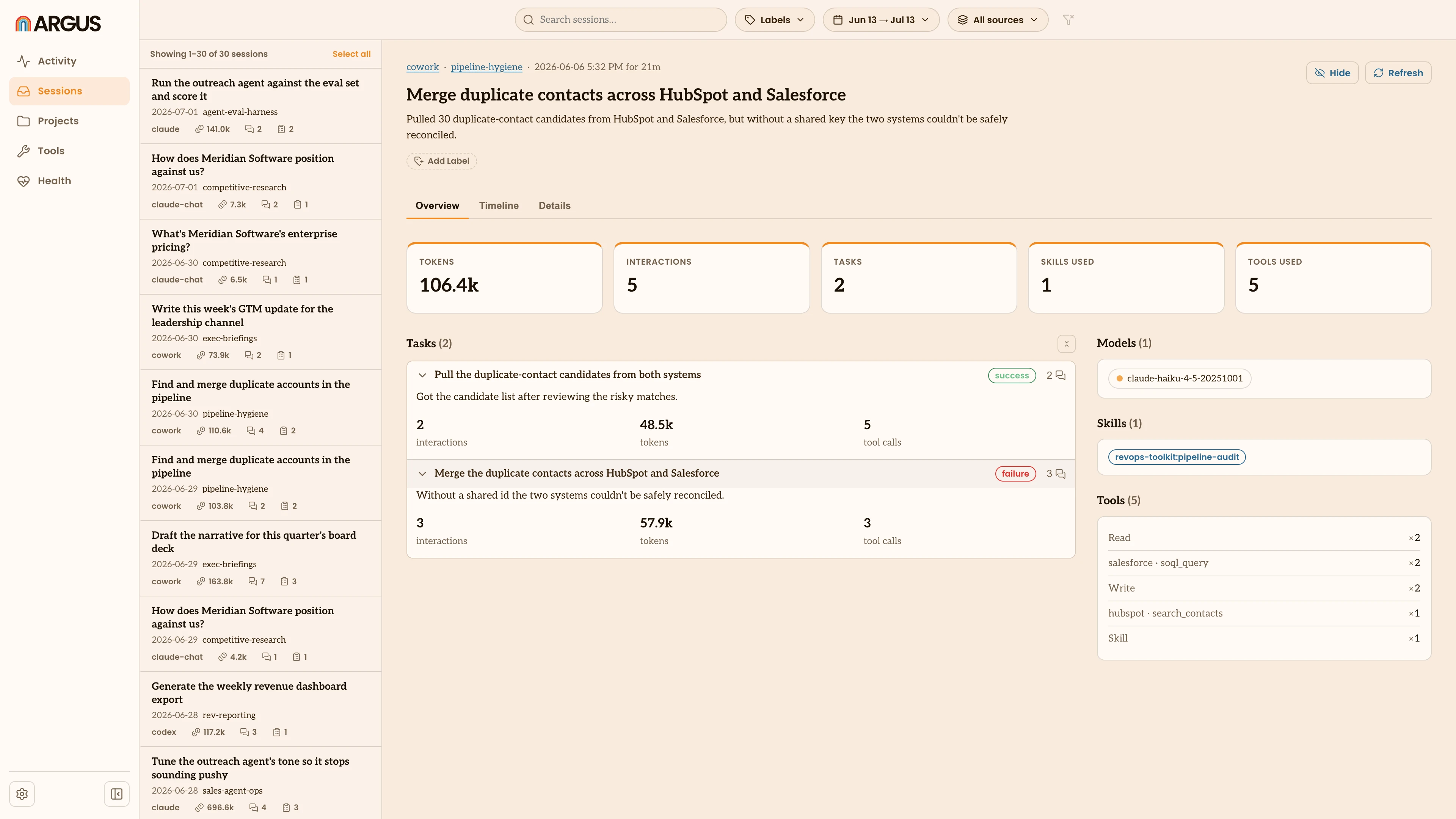
- A short description of what you were trying to do.
- An outcome: success, failure or unclear, judged from the whole exchange rather than just the last message.
- A one-line reason for the outcome.
- Its own tokens, interactions and tool calls, so you can see what each goal took, not just the session total.
In the app
Open a session (see Sessions) and its tasks are listed under Tasks, each with its outcome and an interaction count. Click one to expand it in place, showing the reason for the outcome and what the task took: its interactions, tokens and tool calls. Each task also links into the Timeline, where you can read that stretch of the session.
Extraction
Argus reads a session in two passes:
- It finds the tasks. It reads your prompts and splits the session into the goals you pursued, combining messages that belong to the same goal and skipping setup and noise. The same read also gives the session its title and short summary.
- It judges each one. For every task, it reads the full exchange between you and the agent and decides how it turned out.
This runs quietly as Argus indexes, and only on sessions that have changed. Judging an outcome means re-reading your prompts and responses, so Argus keeps that text in its local store. That stored text is never uploaded, though interpreting a task does send it to the model you pick, covered below.
Turning it on
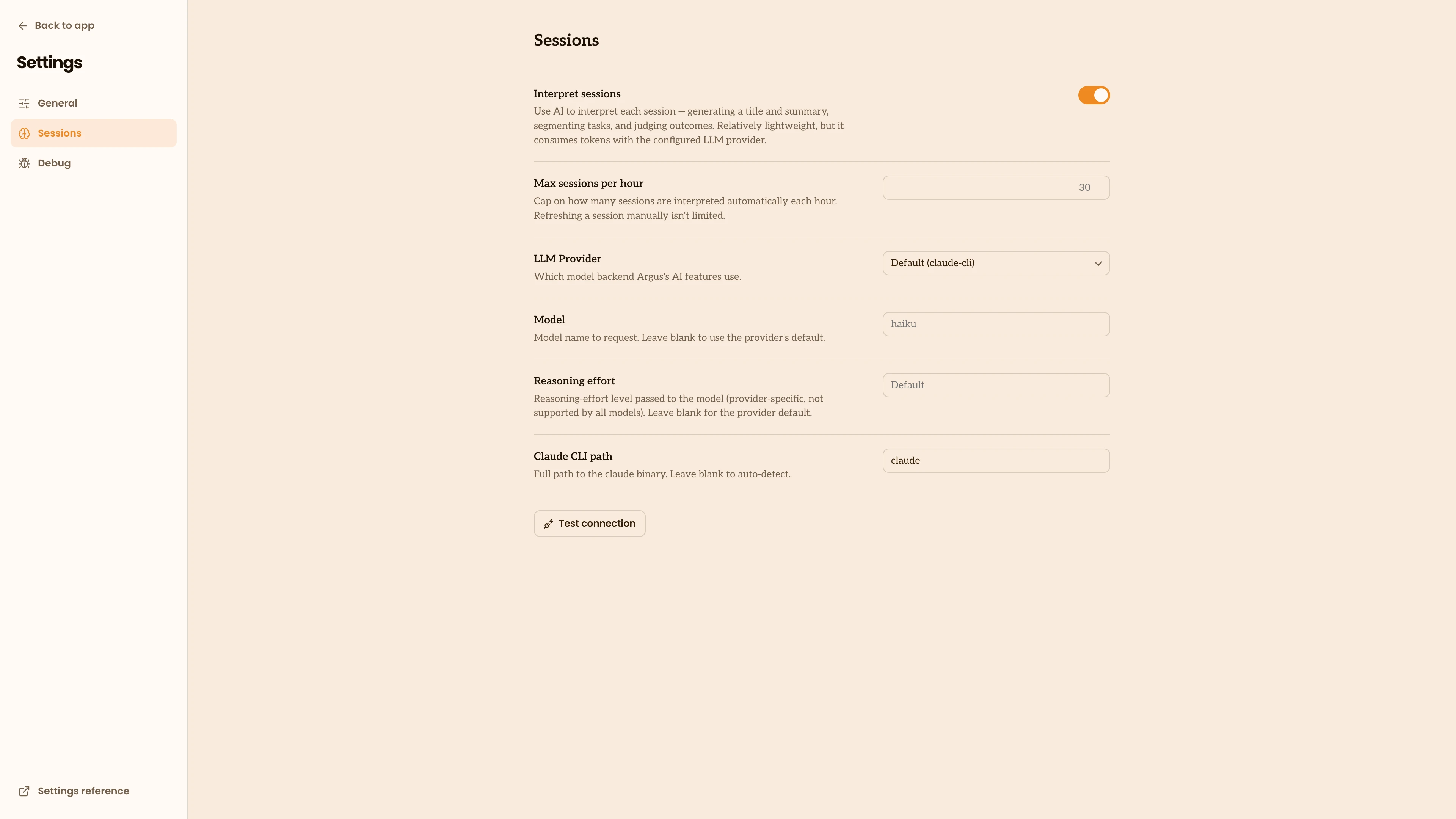
Task interpretation is on by default. You control it in Settings under Sessions:
- Interpret sessions turns it on or off.
- Max sessions per hour caps how many sessions Argus interprets on its own, so a large backlog doesn't run all at once. Refreshing a single session by hand isn't capped.
Model providers
Interpretation needs a model to do the reading, and you choose which one in the same Sessions settings. This is the only part of Argus that sends your sessions to a model, so the choice, including whether anything leaves your machine, is yours.
| Provider | Needs an API key | Sends task text to |
|---|---|---|
| Claude CLI (default) | No | Anthropic, through your Claude sign-in |
| Claude API | Yes | Anthropic |
| OpenAI | Yes | OpenAI |
| Gemini | Yes | |
| OpenRouter | Yes | OpenRouter, which forwards to the model |
| Command | No | Wherever your command sends it (a local model keeps it on your machine) |
Claude CLI is the default and needs no setup if you already use Claude Code. It runs the claude program signed in with your existing Claude login, so there is no separate API key to manage. Like any use of Claude, it sends the task's text to Anthropic's models to do the reading. If Argus can't find the claude program, set its location in Claude CLI path.
The hosted providers (Claude API, OpenAI, Gemini and OpenRouter) call a model over the internet. Each needs an API key, which Argus keeps in your operating system's secure keychain, never in its settings file. Pick a model or leave it blank to use the provider's default, then use Test connection to confirm the key works. With a hosted provider, the prompts and responses for each task are sent to that provider to be judged. OpenRouter is a single key that forwards to models from many providers.
Command runs a model or script you point it at, passing the task's text in and reading the result back. Point it at a model that runs on your own machine and nothing leaves your computer. This is the one way to keep interpretation fully on your machine.
Whichever you choose, interpretation uses tokens with that provider. The default uses your existing Claude sign-in; a provider with its own API key bills that account for what it reads and writes.
Privacy
Two things decide where your task data goes:
- Syncing to a Hub. If you sync usage to an Argus Hub, your tasks and how each one turned out (the outcome and the brief evidence behind it) are included, so an ops leader can see them across a team, along with short snippets like a session's opening prompt. The full text of your sessions is never uploaded; it stays on your machine.
- Interpretation. To judge a task, Argus sends its prompts and responses to the model provider you chose. Every provider does this over the internet, including the default Claude CLI, which sends the text to Anthropic. The one exception is a Command provider pointed at a model that runs on your own machine.